Mastering the Practice Tool
The TryBreathing interface is designed to reduce cognitive load while maximizing physiological adaptation. Here is how to use every feature to its fullest extent.
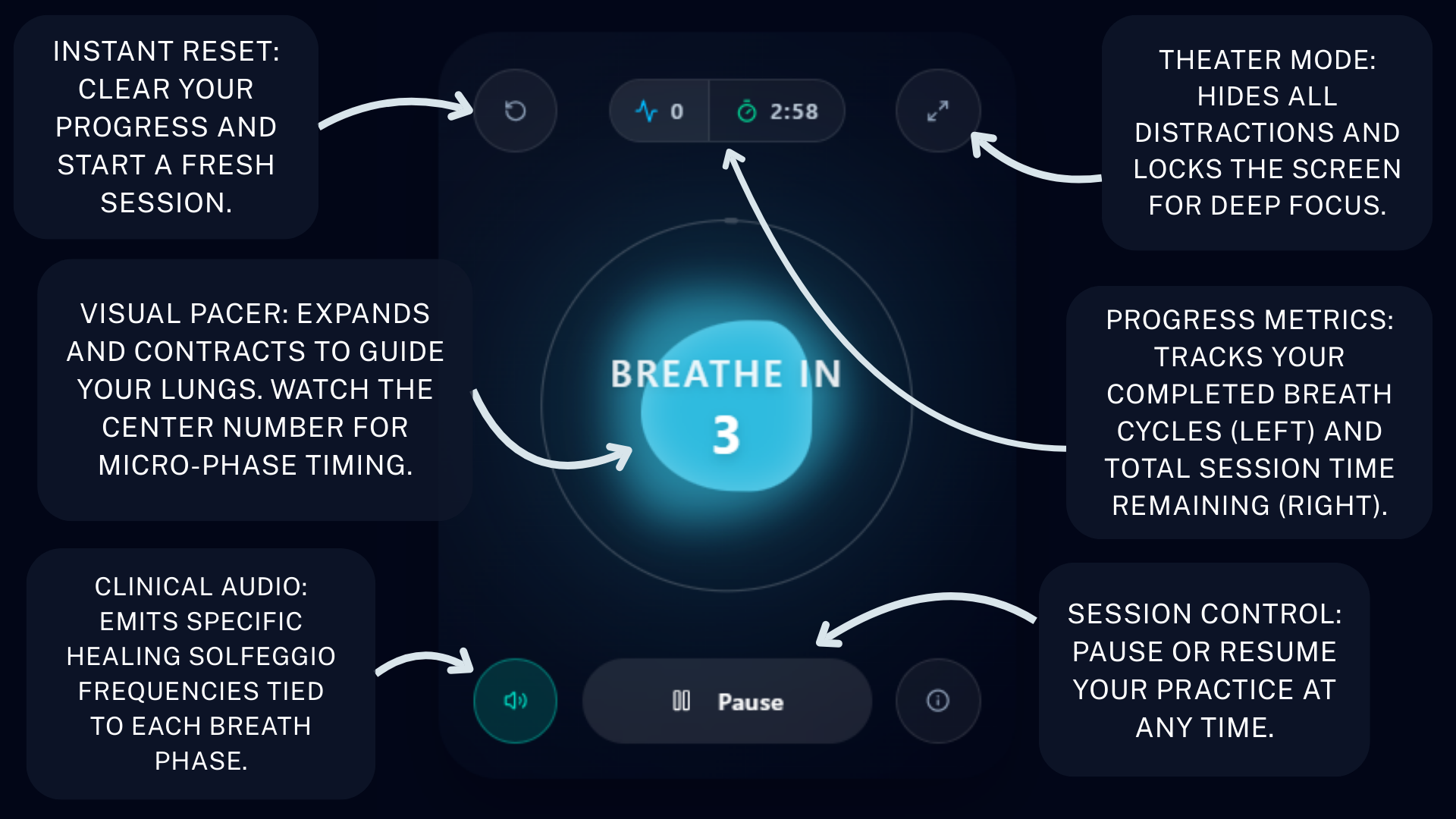
Organic Visual Pacing
The core orb utilizes fluid dynamic rendering to mimic the natural expansion and contraction of the human diaphragm. Follow its movement with your eyes to automatically down-regulate your nervous system without counting in your head.
Clinical Audio Engine
Clicking the speaker icon activates native browser audio. Instead of distrating music, the app generates pure sine waves based on Solfeggio healing frequencies (e.g., 528Hz and 396Hz) mapped precisely to the inhale, hold, and exhale phases.
Dual-Metric Tracking
The split-pill at the top of the interface tracks two vital metrics: your total session countdown, and a cycle counter. The cycle counter increments only after a full, successful breath rotation, allowing you to hit specific dosage protocols (e.g., "10 rounds of Box Breathing").
Theater Focus Mode
By clicking the expand icon in the top right, the app takes over your entire screen and hides browser scrolling. This immersive state prevents digital distractions, making it ideal for high-stress environments or deep sleep preparation.
Understanding the Color Phases
Your Practice Awaits